
Agents & Identity
Every transaction through Sapiom is associated with an agent identity. This lets you track costs, apply rules, and understand behavior at the agent level.
What Is an Agent?
Section titled “What Is an Agent?”In Sapiom, an agent is a logical identity that represents an AI-powered application or workflow. It’s not a technical runtime — it’s a label you assign to group related transactions.
An agent might be:
- A single deployed AI assistant
- A workflow that runs periodically
- A team’s development environment
- A specific feature within a larger application
You decide how to structure your agents based on how you want to track and govern spend.
Setting Agent Identity
Section titled “Setting Agent Identity”Pass agent information when initializing your Sapiom client:
import { createFetch } from '@sapiom/fetch';
const fetch = createFetch({  apiKey: process.env.SAPIOM_API_KEY,  agentName: 'customer-support-agent'});
import { createSapiomMiddleware } from '@sapiom/langchain';
const middleware = createSapiomMiddleware({ apiKey: process.env.SAPIOM_API_KEY, agentName: 'customer-support-agent'});agentName is optional but recommended for tracking and governance.
Naming Conventions
Section titled “Naming Conventions”Choose agent names that reflect their purpose and help you identify them in dashboards:
Recommended patterns:
| Pattern | Example | Use Case |
|---|---|---|
{role}-agent | support-agent | Single-purpose agents |
{team}-{function} | sales-outreach | Team-specific workflows |
{env}-{name} | prod-assistant | Environment separation |
{feature}-{version} | search-v2 | Feature iterations |
Avoid:
- Generic names like
agent1ortest - Overly long names that truncate in UIs
- Names with special characters (stick to alphanumeric and hyphens)
Per-Request Overrides
Section titled “Per-Request Overrides”You can override agent identity for specific requests:
// Use a different agent name for a specific operationawait client.post('/api/task', data, { __sapiom: { agentName: 'background-processor' }});This is useful when a single codebase handles multiple agent roles.
Multiple Agents
Section titled “Multiple Agents”Most organizations run multiple agents. Structure them to match your governance needs:
By Environment
Section titled “By Environment”├── dev-assistant├── staging-assistant└── prod-assistantApply different rules per environment — relaxed limits in dev, strict limits in prod.
By Team
Section titled “By Team”├── engineering-agent├── support-agent└── sales-agentTrack costs per team and set team-specific budgets.
By Function
Section titled “By Function”├── search-agent├── verification-agent└── analysis-agentUnderstand which capabilities drive costs.
Viewing Agent Activity
Section titled “Viewing Agent Activity”Monitor and manage agent spend across your entire organization in the Sapiom dashboard.
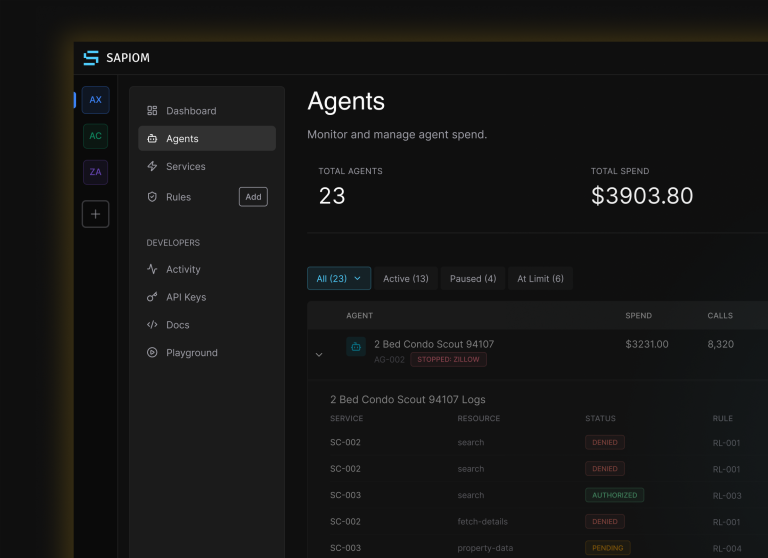
For each agent, you’ll see:
- Agent list: See all agents with recent activity
- Per-agent view: Drill into a specific agent’s transactions, costs, and rule events
- Cost breakdown: Compare spend across agents
- Timeline: Track agent activity over time
Best Practices
Section titled “Best Practices”- Name agents meaningfully — You’ll thank yourself when debugging at 2 AM
- Keep names stable — Changing agent names creates new entries in dashboards
- Start with few agents — You can always split later; consolidating is harder
- Match agents to rules — Structure agents to align with how you want to apply governance rules
Related
Section titled “Related”- Setting Up Rules — Apply rules to specific agents
- Activity — View transaction history
- Integration: Axios — Full SDK configuration options