
Setting Up Rules
Rules define the boundaries within which your agents operate. Set them up before deploying to production to prevent unexpected costs and usage patterns.
Types of Rules
Section titled “Types of Rules”Spend Limits
Section titled “Spend Limits”Cap how much your agents can spend within a given time period or operation:
| Scope | Description | Use Case |
|---|---|---|
| Per Run | Maximum spend for a single agent execution | Prevent infinite loops from draining your budget |
| Daily | Maximum spend per 24-hour period | Set a daily budget ceiling |
| Weekly | Maximum spend per 7-day period | Align with budget review cycles |
| Monthly | Maximum spend per calendar month | Match billing periods |
Usage Limits
Section titled “Usage Limits”Control how many operations your agents can perform:
| Scope | Description | Use Case |
|---|---|---|
| API Calls | Maximum number of requests to a service | Prevent excessive polling or retry loops |
| Tokens | Maximum tokens consumed (for LLM services) | Control model usage costs |
| Per Service | Limits scoped to a specific capability | Different limits for verification vs. search |
Creating Rules in the Dashboard
Section titled “Creating Rules in the Dashboard”Navigate to Rules in the Sapiom dashboard and click Create Rule. Choose from Spend Limit, Usage Limit, or Rate Limit types, then set the amount and period.
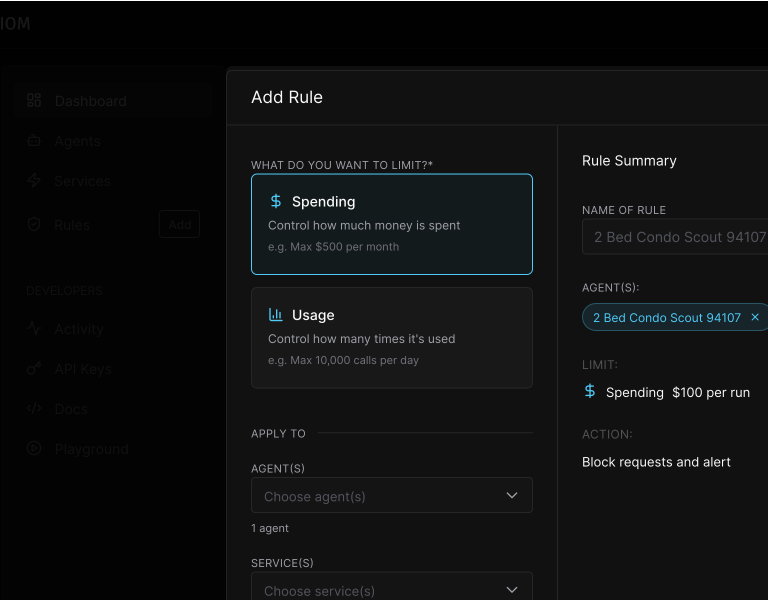
- Click Create Rule
- Select the rule type (spend or usage)
- Configure the scope and limit
- Choose which agents the rule applies to (all agents, specific agents, or agent groups)
- Save the rule
Rules take effect immediately. Existing transactions are not affected, but new transactions will be evaluated against the rule.
What Happens When a Limit is Reached
Section titled “What Happens When a Limit is Reached”When a transaction would exceed a rule’s limit:
- Transaction is blocked — The service call does not proceed
- Agent receives an error — A clear error message indicates which limit was exceeded
- Event is logged — The blocked transaction appears in your dashboard with rule details

Your agent code should handle limit errors gracefully:
try { const result = await client.get('/service-endpoint');} catch (error) { if (error.code === 'LIMIT_EXCEEDED') { // Handle limit gracefully - log, notify, or fallback console.log(`Limit exceeded: ${error.rule}`); }}Best Practices
Section titled “Best Practices”- Start conservative — Set lower limits initially and raise them as you understand usage patterns
- Use per-run limits in development — Catch infinite loops before they become expensive
- Layer your limits — Combine per-run, daily, and monthly limits for comprehensive protection
- Monitor before restricting — Use the dashboard to understand baseline usage before setting limits
- Set alerts below limits — Get notified at 80% of a limit so you can adjust before blocking
Related
Section titled “Related”- Agents & Identity — Track which agents are driving costs
- Activity — View transaction history and rule events