
Canvas, Steps, and Code
The action bar and the Canvas · Steps · Code workbench target the active session’s bound agent project. They do not silently switch to whichever row you most recently focused in the workspace rail. Confirm the active tab and binding before you run or deploy.
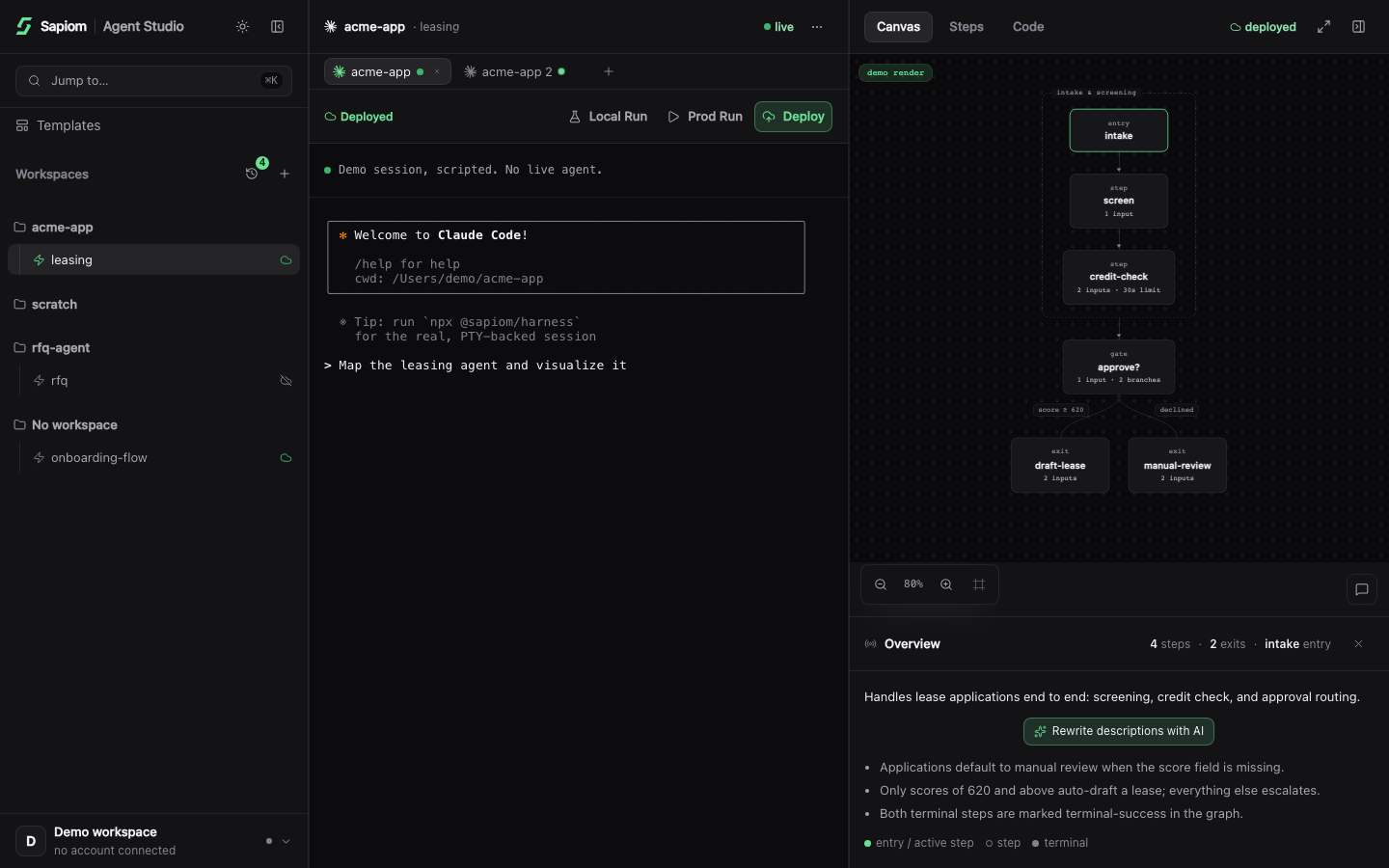
The base Canvas is generated from source without a coding agent. The three lifecycle buttons above the terminal also bypass the coding agent; AI-labelled and conversational actions do not.
Canvas: a deterministic projection
Section titled “Canvas: a deterministic projection”Canvas extracts the bound project’s agent manifest and draws its entries, steps, transitions, terminal outcomes, and statically detectable capability or child-agent calls. The base render is a deterministic projection, not an LLM interpretation and not a full project type-check. Dynamic calls and calls hidden behind shared helpers might not appear.
Studio renders on binding or session start. It also watches .ts and .tsx files beneath the session working directory and refreshes after a save. While source is temporarily invalid during an edit, an automatic refresh preserves the last good diagram when one exists. A later valid save replaces it.
If extraction fails before any good render exists, Canvas shows the failure. Ask coding agent to fix sends that error to the active coding-agent session. Retry invokes the deterministic Visualize render again without using a coding agent. Use the retry after changes outside the watched TypeScript files, such as installing a missing dependency.
The generated per-agent render files under .sapiom/canvas/renders/ belong to Studio; do not edit them. They are local generated state and should remain excluded from Git.
What uses a coding agent on Canvas
Section titled “What uses a coding agent on Canvas”Describe with AI (or Rewrite descriptions with AI) starts a background Claude Code task that edits description fields in your agent source. This background action is currently unavailable for Codex sessions. The ordinary deterministic renderer redraws Canvas after those source changes land.
Selecting a node opens its source and observed-run facts. The chat affordance’s Why slow / stuck?, Debug this step, Explain this step, and free-form Ask actions send bounded step context into the active Claude Code or Codex session. They require that session to be ready and can use your coding-agent plan or credits.
Steps: source plus observed evidence
Section titled “Steps: source plus observed evidence”Open Steps for a list and full-page inspection of the same extracted graph. Before a run, it shows the authored contract: step kind, description, inputs, capabilities, timeout, transitions, and statically detected child-agent launches where available.
After Local Run or Prod Run, choose an observed run from the picker. Steps overlays the latest recorded attempt for each step, including status, duration, input, output, errors, logs, and detected links when the runtime provides them. Local runs also identify stubbed Sapiom calls, unused stubs, and stub warnings. A session rebind does not reattribute an earlier run to the newly bound project.
Code: integration starters after a ready build
Section titled “Code: integration starters after a ready build”The Code tab reflects five cloud states: draft, linked, building, deploy failed, and deployed. A definition link by itself is not proof that the agent can run. Only a ready cloud build enables Prod Run and integration snippets.
When the build is ready, Code shows two starter calls for the deployed agent:
- TypeScript SDK uses
agents.runfrom@sapiom/tools. Install that package, setSAPIOM_API_KEY, and replace the sample input. The SDK call waits for a terminal run and returns its result. - cURL posts directly to the executions endpoint. Replace
YOUR_SAPIOM_API_KEYand the sample input. The request starts a run and returns its execution ID; inspect that execution separately.
Treat both as starters, not application-ready code. Review the inferred agent slug when Studio cannot resolve it from the deployment, supply input that matches the agent schema, and handle failures and secrets for your environment.
Direct actions versus coding-agent actions
Section titled “Direct actions versus coding-agent actions”| Action | Execution path | Requirements and cost boundary |
|---|---|---|
| Local Run | Direct local child process; no coding agent | Requires Sapiom sign-in to use Studio. The run stays local; Sapiom capability calls are served by stubs, so it creates no Sapiom capability spend. User-authored step code can still make its own network calls. |
| Deploy | Direct Studio deploy request; no coding agent | Requires a signed-in Sapiom account. It links the project when needed, pushes its source, and streams the cloud build state. |
| Prod Run | Direct Studio production-run request; no coding agent | Requires sign-in and a ready cloud build. It can incur Sapiom capability spend. The current button sends no custom runtime input, so use it only when empty input is valid for the agent. |
| Visualize / Retry | Direct deterministic render; no coding agent | Requires a live bound session, but not a ready coding-agent prompt. |
| Step chat, template, and idea flows | Active Claude Code or Codex session | Require a usable session and can consume your coding-agent plan or credits. |
| Describe with AI | Background Claude Code task | Currently requires Claude Code; it is unavailable for Codex sessions. |
Direct actions do not become disabled merely because the coding agent is waiting on a trust or login prompt. Actions that inject a prompt do require the coding-agent session to be ready.
Keep going
Section titled “Keep going”© 2026 Sapiom, Inc.