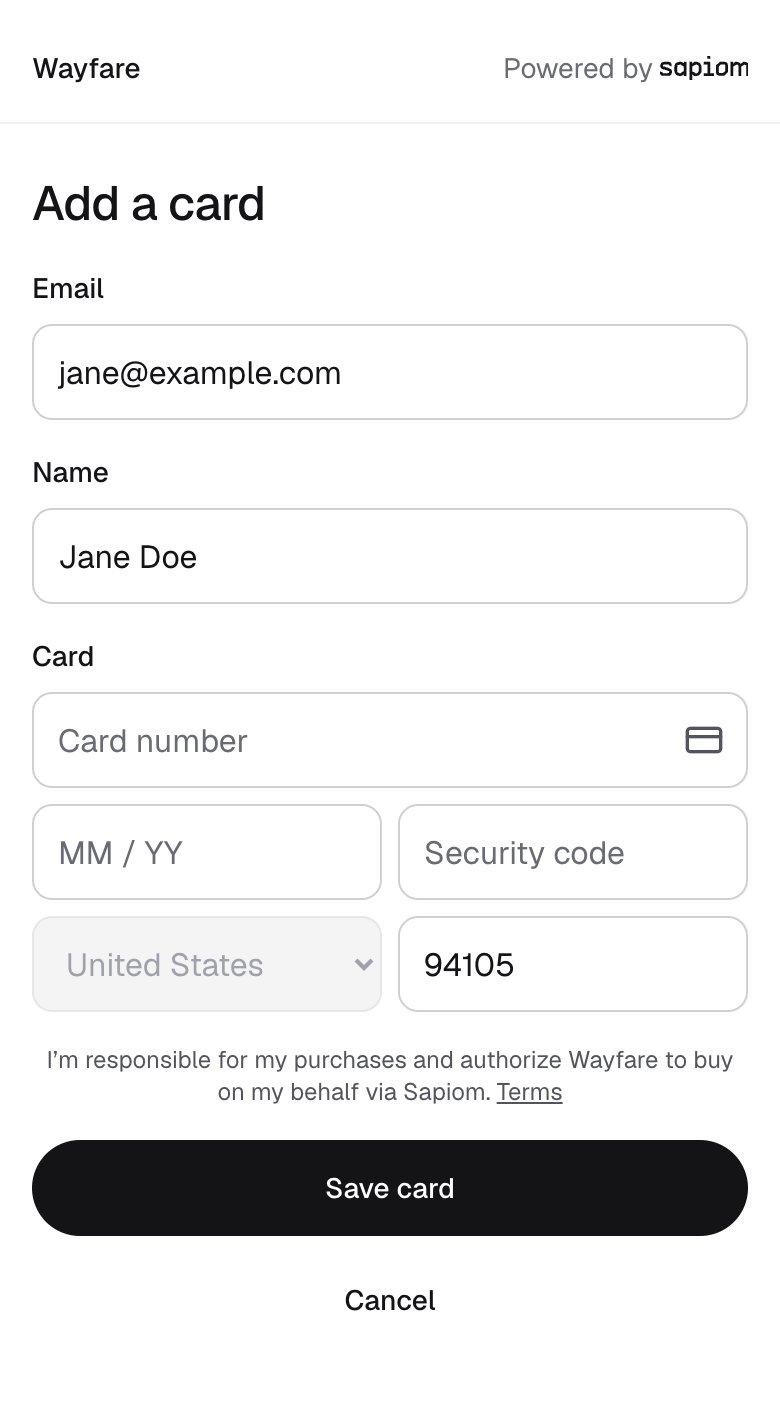
Customize the payment flow by adding your branding to the Add Card, Set Budget, Purchase Confirmation, and Purchase Approval pages. If you have an Admin account, you can update the Display Name to your organization name and add an Icon. The default is your organization name without an icon. Save changes to adjust branding. Open the sample page shows saved branding.
Settings → Branding
Add a card
Confirm this purchase
{"docsConfig":{"theme":"mint","$schema":"https://mintlify.com/docs.json","name":"Sapiom","description":"Let your AI agent buy for each of your users with their own saved card. Sapiom vaults each user's card, authorizes every transaction against real checkout facts, and fills the card into checkout without your agent ever seeing it.","colors":{"primary":"#16A34A","light":"#07C983","dark":"#15803D"},"logo":{"light":"https://mintcdn.com/sapiom-1f975ca2/K4zW5IjQAMJutZvi/logo/light.svg?fit=max\u0026auto=format\u0026n=K4zW5IjQAMJutZvi\u0026q=85\u0026s=37d04ab53c9792ff376364fd56a2799e","dark":"https://mintcdn.com/sapiom-1f975ca2/K4zW5IjQAMJutZvi/logo/dark.svg?fit=max\u0026auto=format\u0026n=K4zW5IjQAMJutZvi\u0026q=85\u0026s=bee7a03b976b9be9e5944daf9ca380ba"},"favicon":"https://mintcdn.com/sapiom-1f975ca2/7k2CTIHfQZNyln5W/favicon.svg?fit=max\u0026auto=format\u0026n=7k2CTIHfQZNyln5W\u0026q=85\u0026s=ffac7db148c05d663b25d3e420b2a24d","api":{"playground":{"display":"simple"}},"navbar":{"primary":{"type":"button","label":"Sign up","href":"https://app.sapiom.ai/signup"}},"contextual":{"options":["copy","view","chatgpt","claude","perplexity","mcp","cursor","vscode"],"display":"header"},"markdown":{"instructions":["Sapiom is for platforms whose agent shops for many users. Each user has their own Sapiom user key and saved cards.","Use the user's key for every call made on that user's behalf. Never use one user's key for another user, and never give the agent the platform key.","Backends call the REST API at https://api.sapiom.ai/v1. Agents can also call the hosted MCP tools at https://api.sapiom.ai/v1/mcp/pay. Both take the key in an x-api-key header.","Keys that start with sk_test_ reach the sandbox, a separate environment with its own users and cards, at the same addresses. Use test card numbers only there.","Never ask a user for a card number, expiry date or CVV in chat. Users enter card details only on Sapiom's hosted pages.","Check the merchant before buying. Use purchase.type ucp_checkout only when the merchant check returns supported. Otherwise use browser_checkout.","Follow the nextAction in each transaction result. Action links are secrets. Send each one only to the person `nextAction.actor` names.","Use one idempotency key per transaction. Resume an unanswered create with the same request and key. If a UCP update or cancellation is uncertain, stop and hand off to a person. If a browser cancellation is uncertain, read the transaction and resend the same cancellation, with the same key, only if it is not closed. Never start a new transaction to escape an uncertain outcome.","For a ucp_checkout purchase, report an order as placed only when order.outcome is confirmed; if it is unknown, stop and hand off to a person. A browser_checkout purchase has no order confirmation (order is null): confirm the order on the merchant's page."]},"styling":{"latex":true},"navigation":{"pages":[]}},"deployment":{"deploymentMetadataValue":{"subdomain":"sapiom-1f975ca2","hasAudioNarration":false,"actualSubdomain":"sapiom-1f975ca2","customDomains":["docs.sapiom.ai"],"gitSource":{"type":"github","owner":"sapiom","repo":"docs","deployBranch":"main","contentDirectory":"","isPrivate":true,"mountPath":"","label":""},"entitlements":{"AI_CHAT":{"status":"ENABLED"},"WEB_MCP":{"status":"ENABLED"},"NARRATION":{"status":"ENABLED"}},"buildId":"6afb3676306e598f3efc0c42","clientVersion":"0.0.4167","searchFilterCounts":[{"language":"default","tag":"API reference","count":26},{"language":"default","tag":"REST API","count":22},{"language":"default","tag":"Docs","count":17},{"language":"default","tag":"Integrate Sapiom","count":10},{"language":"default","tag":"Transactions","count":8},{"language":"default","tag":"Cards","count":6},{"language":"default","tag":"Make a purchase","count":5},{"language":"default","tag":"Control and trust","count":4},{"language":"default","tag":"Users","count":4},{"language":"default","tag":"MCP and SDK","count":2}]},"assistantConfig":{"enableAskAiButton":false,"enableStarterQuestions":true,"enableContextualStarterQuestions":true,"enableAskAiSearchBar":true},"basePath":"","hasChatPermissions":true,"hasWebMcpPermissions":true,"toggles":[{"name":"kill-isr","enabled":true,"variant":{"name":"disabled","enabled":false,"feature_enabled":true},"impressionData":false},{"name":"custom-rbac-roles","enabled":true,"variant":{"name":"disabled","enabled":false,"feature_enabled":true},"impressionData":false},{"name":"agent-mintlify-slack","enabled":true,"variant":{"name":"disabled","enabled":false,"feature_enabled":true},"impressionData":false},{"name":"agent-integrations-settings","enabled":true,"variant":{"name":"disabled","enabled":false,"feature_enabled":true},"impressionData":false},{"name":"rbac-expansion","enabled":true,"variant":{"name":"disabled","enabled":false,"feature_enabled":true},"impressionData":false},{"name":"automations-pr-grouping","enabled":true,"variant":{"name":"disabled","enabled":false,"feature_enabled":true},"impressionData":false},{"name":"custom-prefix","enabled":true,"variant":{"name":"disabled","enabled":false,"feature_enabled":true},"impressionData":false},{"name":"analytics-v7","enabled":true,"variant":{"name":"disabled","enabled":false,"feature_enabled":true},"impressionData":false},{"name":"user-flows-analytics","enabled":true,"variant":{"name":"disabled","enabled":false,"feature_enabled":true},"impressionData":false},{"name":"no-publish-flow","enabled":true,"variant":{"name":"disabled","enabled":false,"feature_enabled":true},"impressionData":false},{"name":"workos-onboarding","enabled":true,"variant":{"name":"disabled","enabled":false,"feature_enabled":true},"impressionData":false},{"name":"snapshot-serving-live","enabled":true,"variant":{"name":"disabled","enabled":false,"feature_enabled":true},"impressionData":false},{"name":"stripTemperatureMiddleware","enabled":true,"variant":{"name":"disabled","enabled":false,"feature_enabled":true},"impressionData":false},{"name":"support-platform-pylon-zendesk","enabled":true,"variant":{"name":"disabled","enabled":false,"feature_enabled":true},"impressionData":false},{"name":"snapshot-serving","enabled":true,"variant":{"name":"disabled","enabled":false,"feature_enabled":true},"impressionData":false},{"name":"instant-rollback","enabled":true,"variant":{"name":"disabled","enabled":false,"feature_enabled":true},"impressionData":false},{"name":"granular-notifications-server","enabled":true,"variant":{"name":"disabled","enabled":false,"feature_enabled":true},"impressionData":false},{"name":"granular-notifications","enabled":true,"variant":{"name":"disabled","enabled":false,"feature_enabled":true},"impressionData":false},{"name":"automations-fable","enabled":true,"variant":{"name":"disabled","enabled":false,"feature_enabled":true},"impressionData":false},{"name":"fixed-ai-action-pricing","enabled":true,"variant":{"name":"disabled","enabled":false,"feature_enabled":true},"impressionData":false},{"name":"automation-resolve-merge-conflict","enabled":true,"variant":{"name":"disabled","enabled":false,"feature_enabled":true},"impressionData":false},{"name":"scoped-publishing","enabled":true,"variant":{"name":"disabled","enabled":false,"feature_enabled":true},"impressionData":false},{"name":"mintql","enabled":true,"variant":{"name":"disabled","enabled":false,"feature_enabled":true},"impressionData":false},{"name":"page-level-analytics","enabled":true,"variant":{"name":"disabled","enabled":false,"feature_enabled":true},"impressionData":false},{"name":"editor-version-history-v2","enabled":true,"variant":{"name":"disabled","enabled":false,"feature_enabled":true},"impressionData":false},{"name":"billing-page-v2","enabled":true,"variant":{"name":"disabled","enabled":false,"feature_enabled":true},"impressionData":false},{"name":"full-page-search","enabled":true,"variant":{"name":"disabled","enabled":false,"feature_enabled":true},"impressionData":false},{"name":"workspace-projects","enabled":true,"variant":{"name":"disabled","enabled":false,"feature_enabled":true},"impressionData":false},{"name":"assistant-v5","enabled":true,"variant":{"name":"disabled","enabled":false,"feature_enabled":true},"impressionData":false},{"name":"fork-pr-previews","enabled":true,"variant":{"name":"disabled","enabled":false,"feature_enabled":true},"impressionData":false},{"name":"revalidation-jwt","enabled":true,"variant":{"name":"disabled","enabled":false,"feature_enabled":true},"impressionData":false},{"name":"workos-sso-scim","enabled":true,"variant":{"name":"disabled","enabled":false,"feature_enabled":true},"impressionData":false},{"name":"hobby-abuse-scan","enabled":true,"variant":{"name":"disabled","enabled":false,"feature_enabled":true},"impressionData":false},{"name":"dashboard-inbox","enabled":true,"variant":{"name":"disabled","enabled":false,"feature_enabled":true},"impressionData":false},{"name":"workos-signup","enabled":true,"variant":{"name":"disabled","enabled":false,"feature_enabled":true},"impressionData":false},{"name":"turbopuffer-dual-write","enabled":true,"variant":{"name":"disabled","enabled":false,"feature_enabled":true},"impressionData":false},{"name":"workos-enabled","enabled":true,"variant":{"name":"disabled","enabled":false,"feature_enabled":true},"impressionData":false},{"name":"approve-review-flow","enabled":true,"variant":{"name":"disabled","enabled":false,"feature_enabled":true},"impressionData":false},{"name":"editor-metadata","enabled":true,"variant":{"name":"disabled","enabled":false,"feature_enabled":true},"impressionData":false},{"name":"sso-setup-deadline-banner","enabled":true,"variant":{"name":"disabled","enabled":false,"feature_enabled":true},"impressionData":false},{"name":"turbopuffer-serve","enabled":true,"variant":{"name":"disabled","enabled":false,"feature_enabled":true},"impressionData":false},{"name":"live-agents","enabled":true,"variant":{"name":"disabled","enabled":false,"feature_enabled":true},"impressionData":false},{"name":"llms-txt-v2","enabled":true,"variant":{"name":"disabled","enabled":false,"feature_enabled":true},"impressionData":false}],"googleFontsInlined":false},"customCss":[{"filePath":"style.css","content":".code-block-background[style*=\"height:190px\"]{height:220px!important}"}],"page":{"pagePath":"cards/brand-customization","slug":"/cards/brand-customization","pageMetadata":{"title":"Brand customization","description":null,"href":"/cards/brand-customization"},"pageType":"default","mdx":{"mdxSource":{"compiledSource":"\"use strict\";const{Fragment:_Fragment,jsx:_jsx,jsxs:_jsxs}=arguments[0];const{useMDXComponents:_provideComponents}=arguments[0];function _createMdxContent(props){const _components={a:`a`,p:`p`,..._provideComponents(),...props.components},{Columns,Frame,OptimizedImage}=_components;if(!Columns)_missingMdxReference(`Columns`,true);if(!Frame)_missingMdxReference(`Frame`,true);if(!OptimizedImage)_missingMdxReference(`OptimizedImage`,true);return _jsxs(_Fragment,{children:[_jsxs(_components.p,{children:[`Customize the payment flow by adding your branding to the `,_jsx(_components.a,{href:`/cards/add-a-card`,children:`Add Card, Set Budget`}),`, `,_jsx(_components.a,{href:`/transactions/make-a-purchase`,children:`Purchase Confirmation, and Purchase Approval`}),` pages. `]}),`\n`,_jsx(_components.p,{children:`If you have an Admin account, you can update the Display Name to your organization name and add an Icon. The default is your organization name without an icon. Save changes to adjust branding. Open the sample page shows saved branding.`}),`\n`,_jsx(Frame,{caption:`Settings → Branding`,children:_jsx(OptimizedImage,{src:`https://mintcdn.com/sapiom-1f975ca2/9get71X2H3eNyHfD/images/wayfare/settings-branding.jpg?fit=max\u0026auto=format\u0026n=9get71X2H3eNyHfD\u0026q=85\u0026s=8388188f0df4336b5bdf403f10261530`,alt:`Settings, Branding tab: a preview of the Add a card page for Wayfare with tabs for Add a card, Set a budget, Confirm and Approve a purchase, and the Display name and Icon settings with Reset branding and Save changes`,\"data-og-width\":`2560`,width:`2560`,\"data-og-height\":`1800`,height:`1800`,\"data-path\":`images/wayfare/settings-branding.jpg`,\"data-optimize\":`true`,\"data-opv\":`3`,srcset:`https://mintcdn.com/sapiom-1f975ca2/9get71X2H3eNyHfD/images/wayfare/settings-branding.jpg?w=280\u0026fit=max\u0026auto=format\u0026n=9get71X2H3eNyHfD\u0026q=85\u0026s=798de903efd567c9b554074918e8590c 280w, https://mintcdn.com/sapiom-1f975ca2/9get71X2H3eNyHfD/images/wayfare/settings-branding.jpg?w=560\u0026fit=max\u0026auto=format\u0026n=9get71X2H3eNyHfD\u0026q=85\u0026s=e76dd604ad1fc95fc9a61770eff3610c 560w, https://mintcdn.com/sapiom-1f975ca2/9get71X2H3eNyHfD/images/wayfare/settings-branding.jpg?w=840\u0026fit=max\u0026auto=format\u0026n=9get71X2H3eNyHfD\u0026q=85\u0026s=aea1111bd1861c35fb788a9aa66f5f4c 840w, https://mintcdn.com/sapiom-1f975ca2/9get71X2H3eNyHfD/images/wayfare/settings-branding.jpg?w=1100\u0026fit=max\u0026auto=format\u0026n=9get71X2H3eNyHfD\u0026q=85\u0026s=f6bb550e5f7d50a0cd95dc4b00e4becf 1100w, https://mintcdn.com/sapiom-1f975ca2/9get71X2H3eNyHfD/images/wayfare/settings-branding.jpg?w=1650\u0026fit=max\u0026auto=format\u0026n=9get71X2H3eNyHfD\u0026q=85\u0026s=6bfba939d2235290ae481cd91d90d64f 1650w, https://mintcdn.com/sapiom-1f975ca2/9get71X2H3eNyHfD/images/wayfare/settings-branding.jpg?w=2500\u0026fit=max\u0026auto=format\u0026n=9get71X2H3eNyHfD\u0026q=85\u0026s=9b8e46d4de01ce91f1146cc6b42e3e51 2500w`})}),`\n`,_jsxs(Columns,{cols:2,children:[_jsx(Frame,{caption:`Add a card`,children:_jsx(OptimizedImage,{src:`https://mintcdn.com/sapiom-1f975ca2/aGERYeS4JlKIoVA1/images/card-setup-page-v2.png?fit=max\u0026auto=format\u0026n=aGERYeS4JlKIoVA1\u0026q=85\u0026s=b098393a761cfc6f7c112e9087813a1e`,alt:`Add a card page with the platform's name, Wayfare, at the top left and Powered by Sapiom at the top right`,\"data-og-width\":`780`,width:`780`,\"data-og-height\":`1412`,height:`1412`,\"data-path\":`images/card-setup-page-v2.png`,\"data-optimize\":`true`,\"data-opv\":`3`,srcset:`https://mintcdn.com/sapiom-1f975ca2/aGERYeS4JlKIoVA1/images/card-setup-page-v2.png?w=280\u0026fit=max\u0026auto=format\u0026n=aGERYeS4JlKIoVA1\u0026q=85\u0026s=861f102d5439080b8da49fb8b1c1bb98 280w, https://mintcdn.com/sapiom-1f975ca2/aGERYeS4JlKIoVA1/images/card-setup-page-v2.png?w=560\u0026fit=max\u0026auto=format\u0026n=aGERYeS4JlKIoVA1\u0026q=85\u0026s=22d4e55929455f78cc80877fdfff898a 560w, https://mintcdn.com/sapiom-1f975ca2/aGERYeS4JlKIoVA1/images/card-setup-page-v2.png?w=840\u0026fit=max\u0026auto=format\u0026n=aGERYeS4JlKIoVA1\u0026q=85\u0026s=fbe9a719cd8662fee701b94c6777863a 840w, https://mintcdn.com/sapiom-1f975ca2/aGERYeS4JlKIoVA1/images/card-setup-page-v2.png?w=1100\u0026fit=max\u0026auto=format\u0026n=aGERYeS4JlKIoVA1\u0026q=85\u0026s=d59e58d6c071577dca0f0595be160478 1100w, https://mintcdn.com/sapiom-1f975ca2/aGERYeS4JlKIoVA1/images/card-setup-page-v2.png?w=1650\u0026fit=max\u0026auto=format\u0026n=aGERYeS4JlKIoVA1\u0026q=85\u0026s=9e7b5ea21c234ca1705af0aab4102323 1650w, https://mintcdn.com/sapiom-1f975ca2/aGERYeS4JlKIoVA1/images/card-setup-page-v2.png?w=2500\u0026fit=max\u0026auto=format\u0026n=aGERYeS4JlKIoVA1\u0026q=85\u0026s=070299883919c40656a35190c1d91fd0 2500w`})}),_jsx(Frame,{caption:`Confirm this purchase`,children:_jsx(OptimizedImage,{src:`https://mintcdn.com/sapiom-1f975ca2/aGERYeS4JlKIoVA1/images/purchase-approval-page-v3.png?fit=max\u0026auto=format\u0026n=aGERYeS4JlKIoVA1\u0026q=85\u0026s=7684c0de1cce4ca6fdd056a617f5b572`,alt:`Confirm this purchase page with the platform's name, Wayfare, at the top left and Powered by Sapiom at the top right`,\"data-og-width\":`780`,width:`780`,\"data-og-height\":`1220`,height:`1220`,\"data-path\":`images/purchase-approval-page-v3.png`,\"data-optimize\":`true`,\"data-opv\":`3`,srcset:`https://mintcdn.com/sapiom-1f975ca2/aGERYeS4JlKIoVA1/images/purchase-approval-page-v3.png?w=280\u0026fit=max\u0026auto=format\u0026n=aGERYeS4JlKIoVA1\u0026q=85\u0026s=088f460f84dea9e713bc9735f71dbbb7 280w, https://mintcdn.com/sapiom-1f975ca2/aGERYeS4JlKIoVA1/images/purchase-approval-page-v3.png?w=560\u0026fit=max\u0026auto=format\u0026n=aGERYeS4JlKIoVA1\u0026q=85\u0026s=81ff52f974ee2062f4727e6c8a16cd5e 560w, https://mintcdn.com/sapiom-1f975ca2/aGERYeS4JlKIoVA1/images/purchase-approval-page-v3.png?w=840\u0026fit=max\u0026auto=format\u0026n=aGERYeS4JlKIoVA1\u0026q=85\u0026s=ca52c8774360cc2bbb803c81276adea9 840w, https://mintcdn.com/sapiom-1f975ca2/aGERYeS4JlKIoVA1/images/purchase-approval-page-v3.png?w=1100\u0026fit=max\u0026auto=format\u0026n=aGERYeS4JlKIoVA1\u0026q=85\u0026s=a3d5cfcdc234a1265543de294679779d 1100w, https://mintcdn.com/sapiom-1f975ca2/aGERYeS4JlKIoVA1/images/purchase-approval-page-v3.png?w=1650\u0026fit=max\u0026auto=format\u0026n=aGERYeS4JlKIoVA1\u0026q=85\u0026s=9406c8cf748c025ff69a92ab75afa970 1650w, https://mintcdn.com/sapiom-1f975ca2/aGERYeS4JlKIoVA1/images/purchase-approval-page-v3.png?w=2500\u0026fit=max\u0026auto=format\u0026n=aGERYeS4JlKIoVA1\u0026q=85\u0026s=faf4b4d71084186b946476af9a648b32 2500w`})})]})]})}function MDXContent(props={}){const{wrapper:MDXLayout}={..._provideComponents(),...props.components};return MDXLayout?_jsx(MDXLayout,{...props,children:_jsx(_createMdxContent,{...props})}):_createMdxContent(props)}return{default:MDXContent};function _missingMdxReference(id,component){throw new Error(`Expected `+(component?`component`:`object`)+\" `\"+id+\"` to be defined: you likely forgot to import, pass, or provide it.\")}","frontmatter":{},"scope":{"config":{},"pageMetadata":{"title":"Brand customization","description":null,"href":"/cards/brand-customization"}}},"mdxSourceWithNoJs":null},"mdxExtracts":{"tableOfContents":[],"codeExamples":{}},"jsLinks":[],"subdomain":"sapiom-1f975ca2","siteName":"Sapiom","title":"Brand customization - Sapiom","contextualStarterQuestions":[{"_id":"6afacf3e3b885984bf541b25","deploymentId":"6ad7ec02d3b4a79828e24ed4","questionText":"How do I change the display name?","status":"active","generatedBy":"contextual","path":"cards/brand-customization","createdAt":"2026-11-16T09:39:10.057Z","updatedAt":"2026-11-16T09:39:10.057Z","__v":0},{"_id":"6afacf3e3b885984bf541b24","deploymentId":"6ad7ec02d3b4a79828e24ed4","questionText":"What pages can I customize?","status":"active","generatedBy":"contextual","path":"cards/brand-customization","createdAt":"2026-11-16T09:39:10.056Z","updatedAt":"2026-11-16T09:39:10.056Z","__v":0},{"_id":"6afacf3e3b885984bf541b23","deploymentId":"6ad7ec02d3b4a79828e24ed4","questionText":"How do I add my company logo?","status":"active","generatedBy":"contextual","path":"cards/brand-customization","createdAt":"2026-11-16T09:39:10.056Z","updatedAt":"2026-11-16T09:39:10.056Z","__v":0}],"navMaps":{"firstHrefInVersion":{},"firstHrefInLanguage":{}},"lastModified":"2026-11-16T09:39:06.149Z","originalFileLocation":"cards/brand-customization.mdx"},"headHtml":"\u003cscript data-mint-head>(function(){var d=document.documentElement,p=null;if(!p){try{p=localStorage.getItem(\"isDarkMode\")}catch(e){}if(p==='true')p='dark';else if(p==='false')p='light';if(p!=='light'\u0026\u0026p!=='dark'\u0026\u0026p!=='system')p=\"system\"}var r=p==='system'?(matchMedia(\"(prefers-color-scheme: dark)\").matches?'dark':'light'):p;d.classList.remove(r==='dark'?'light':'dark');d.classList.add(r);d.setAttribute(\"data-theme-preference\",p)})();\u003c/script>\u003cmeta data-mint-head name=\"application-name\" content=\"Sapiom\">\u003cmeta data-mint-head name=\"generator\" content=\"Mintlify\">\u003clink data-mint-head rel=\"icon\" type=\"image/png\" sizes=\"192x192\" href=\"/mintlify-assets/_mintlify/favicons/sapiom-1f975ca2/YgmZC92WGBAfsBaa/_generated/favicon/android-chrome-192x192.png\" media=\"(prefers-color-scheme: light)\">\u003clink data-mint-head rel=\"apple-touch-icon\" type=\"image/png\" sizes=\"180x180\" href=\"/mintlify-assets/_mintlify/favicons/sapiom-1f975ca2/YgmZC92WGBAfsBaa/_generated/favicon/apple-touch-icon.png\">\u003clink data-mint-head rel=\"icon\" type=\"image/png\" sizes=\"16x16\" href=\"/mintlify-assets/_mintlify/favicons/sapiom-1f975ca2/YgmZC92WGBAfsBaa/_generated/favicon/favicon-16x16.png\" media=\"(prefers-color-scheme: light)\">\u003clink data-mint-head rel=\"icon\" type=\"image/png\" sizes=\"32x32\" href=\"/mintlify-assets/_mintlify/favicons/sapiom-1f975ca2/YgmZC92WGBAfsBaa/_generated/favicon/favicon-32x32.png\" media=\"(prefers-color-scheme: light)\">\u003clink data-mint-head rel=\"shortcut icon\" type=\"image/x-icon\" href=\"/mintlify-assets/_mintlify/favicons/sapiom-1f975ca2/YgmZC92WGBAfsBaa/_generated/favicon/favicon.ico\" media=\"(prefers-color-scheme: light)\">\u003clink data-mint-head rel=\"icon\" type=\"image/png\" sizes=\"192x192\" href=\"/mintlify-assets/_mintlify/favicons/sapiom-1f975ca2/YgmZC92WGBAfsBaa/_generated/favicon-dark/android-chrome-192x192.png\" media=\"(prefers-color-scheme: dark)\">\u003clink data-mint-head rel=\"icon\" type=\"image/png\" sizes=\"16x16\" href=\"/mintlify-assets/_mintlify/favicons/sapiom-1f975ca2/YgmZC92WGBAfsBaa/_generated/favicon-dark/favicon-16x16.png\" media=\"(prefers-color-scheme: dark)\">\u003clink data-mint-head rel=\"icon\" type=\"image/png\" sizes=\"32x32\" href=\"/mintlify-assets/_mintlify/favicons/sapiom-1f975ca2/YgmZC92WGBAfsBaa/_generated/favicon-dark/favicon-32x32.png\" media=\"(prefers-color-scheme: dark)\">\u003clink data-mint-head rel=\"shortcut icon\" type=\"image/x-icon\" href=\"/mintlify-assets/_mintlify/favicons/sapiom-1f975ca2/YgmZC92WGBAfsBaa/_generated/favicon-dark/favicon.ico\" media=\"(prefers-color-scheme: dark)\">\u003cmeta data-mint-head property=\"og:title\" content=\"Brand customization - Sapiom\">\u003cmeta data-mint-head property=\"og:site_name\" content=\"Sapiom\">\u003cmeta data-mint-head property=\"og:url\" content=\"https://docs.sapiom.ai/cards/brand-customization\">\u003cmeta data-mint-head property=\"og:type\" content=\"website\">\u003cmeta data-mint-head property=\"og:image\" content=\"https://sapiom-1f975ca2.mintlify.site/_mintlify/api/og/v2?division=Control+and+trust\u0026amp;title=Brand+customization\u0026amp;theme=e82bf3ae0cd73b9b01c326a0\u0026amp;signature=86c615c4a2b5f9b306394963ed4263f13d7a4089cfd34f29d12f59af7b8922cb\">\u003cmeta data-mint-head property=\"og:image:width\" content=\"1200\">\u003cmeta data-mint-head property=\"og:image:height\" content=\"630\">\u003cmeta data-mint-head name=\"twitter:card\" content=\"summary_large_image\">\u003cmeta data-mint-head name=\"twitter:title\" content=\"Brand customization - Sapiom\">\u003cmeta data-mint-head name=\"twitter:image\" content=\"https://sapiom-1f975ca2.mintlify.site/_mintlify/api/og/v2?division=Control+and+trust\u0026amp;title=Brand+customization\u0026amp;theme=e82bf3ae0cd73b9b01c326a0\u0026amp;signature=86c615c4a2b5f9b306394963ed4263f13d7a4089cfd34f29d12f59af7b8922cb\">\u003cmeta data-mint-head name=\"twitter:image:width\" content=\"1200\">\u003cmeta data-mint-head name=\"twitter:image:height\" content=\"630\">\u003cmeta data-mint-head name=\"msapplication-config\" content=\"/mintlify-assets/_mintlify/favicons/sapiom-1f975ca2/YgmZC92WGBAfsBaa/_generated/favicon/browserconfig.xml\">\u003cmeta data-mint-head name=\"apple-mobile-web-app-title\" content=\"Sapiom\">\u003cmeta data-mint-head name=\"msapplication-TileColor\" content=\"#16A34A\">\u003clink data-mint-head rel=\"canonical\" href=\"https://docs.sapiom.ai/cards/brand-customization\">\u003clink data-mint-head rel=\"alternate\" type=\"application/xml\" href=\"/sitemap.xml\">\u003clink data-mint-head rel=\"alternate\" type=\"text/markdown\" href=\"/cards/brand-customization.md\">\u003cscript data-mint-head type=\"application/ld+json\">{\"@context\":\"https://schema.org\",\"@graph\":[{\"@type\":\"Organization\",\"@id\":\"https://docs.sapiom.ai/#organization\",\"name\":\"Sapiom\",\"url\":\"https://docs.sapiom.ai\",\"logo\":{\"@type\":\"ImageObject\",\"url\":\"https://mintcdn.com/sapiom-1f975ca2/K4zW5IjQAMJutZvi/logo/light.svg?fit=max\u0026auto=format\u0026n=K4zW5IjQAMJutZvi\u0026q=85\u0026s=37d04ab53c9792ff376364fd56a2799e\"}},{\"@type\":\"WebSite\",\"@id\":\"https://docs.sapiom.ai#website\",\"name\":\"Sapiom\",\"url\":\"https://docs.sapiom.ai\",\"publisher\":{\"@id\":\"https://docs.sapiom.ai/#organization\"}},{\"@type\":\"WebPage\",\"@id\":\"https://docs.sapiom.ai/cards/brand-customization#webpage\",\"url\":\"https://docs.sapiom.ai/cards/brand-customization\",\"name\":\"Brand customization\",\"dateModified\":\"2026-11-16T09:39:06.149Z\",\"isPartOf\":{\"@id\":\"https://docs.sapiom.ai#website\"},\"breadcrumb\":{\"@id\":\"https://docs.sapiom.ai/cards/brand-customization#breadcrumb\"}},{\"@type\":\"BreadcrumbList\",\"@id\":\"https://docs.sapiom.ai/cards/brand-customization#breadcrumb\",\"itemListElement\":[{\"@type\":\"ListItem\",\"position\":1,\"name\":\"Control and trust\",\"item\":\"https://docs.sapiom.ai/controls/budgets-and-spending-limits\"},{\"@type\":\"ListItem\",\"position\":2,\"name\":\"Brand customization\",\"item\":\"https://docs.sapiom.ai/cards/brand-customization\"}]},{\"@type\":[\"Article\",\"TechArticle\"],\"@id\":\"https://docs.sapiom.ai/cards/brand-customization#article\",\"headline\":\"Brand customization\",\"name\":\"Brand customization\",\"url\":\"https://docs.sapiom.ai/cards/brand-customization\",\"mainEntityOfPage\":{\"@id\":\"https://docs.sapiom.ai/cards/brand-customization#webpage\"},\"dateModified\":\"2026-11-16T09:39:06.149Z\",\"publisher\":{\"@id\":\"https://docs.sapiom.ai/#organization\"},\"isPartOf\":{\"@id\":\"https://docs.sapiom.ai#website\"}}]}\u003c/script>\u003cscript data-mint-head type=\"application/ld+json\">{\"@context\":\"https://schema.org\",\"@type\":\"WebSite\",\"name\":\"Sapiom\",\"publisher\":{\"@type\":\"Organization\",\"name\":\"Sapiom\"},\"provider\":{\"@type\":\"Organization\",\"name\":\"Mintlify\",\"url\":\"https://mintlify.com\"}}\u003c/script>","agentPointerHref":"/cards/brand-customization.md","siteName":"Sapiom","nav":{"global":null,"tabs":[{"tab":"Docs","groups":[{"group":"Get started","pages":[{"title":"Agent purchases with Sapiom","sidebarTitle":"Overview","href":""},{"title":"First purchase","href":"/first-purchase"}]},{"group":"Integrate Sapiom","pages":[{"title":"How an agent pays","href":"/how-an-agent-pays"},{"title":"Set up your platform","href":"/set-up"},{"title":"Add a card","href":"/cards/add-a-card"},{"group":"Make a purchase","root":{"title":"Make a purchase","href":"/transactions/make-a-purchase"},"pages":[{"title":"Use Sapiom Browser Pay with Anchor","sidebarTitle":"Anchor","icon":"https://mintlify.s3.us-west-1.amazonaws.com/sapiom-1f975ca2/images/browser-providers/anchor.svg","href":"/transactions/browsers/anchor"},{"title":"Use Sapiom Browser Pay with Kernel","sidebarTitle":"Kernel","icon":"https://mintlify.s3.us-west-1.amazonaws.com/sapiom-1f975ca2/images/browser-providers/kernel.png","href":"/transactions/browsers/kernel"},{"title":"Use Sapiom Browser Pay with Browserbase","sidebarTitle":"Browserbase","icon":"https://mintlify.s3.us-west-1.amazonaws.com/sapiom-1f975ca2/images/browser-providers/browserbase.png","href":"/transactions/browsers/browserbase"},{"title":"Use Sapiom Browser Pay with Browser Use","sidebarTitle":"Browser Use","icon":"https://mintlify.s3.us-west-1.amazonaws.com/sapiom-1f975ca2/images/browser-providers/browser-use.png","href":"/transactions/browsers/browser-use"},{"title":"Local browser","href":"/transactions/browsers/local"}]},{"title":"Confirm and recover","href":"/transactions/confirm-and-recover"},{"title":"Sandbox","href":"/sandbox"}]},{"group":"Control and trust","pages":[{"title":"Budgets and spending limits","description":"Build trust by letting users stay in control of their agent spend","href":"/controls/budgets-and-spending-limits"},{"title":"Brand customization","href":"/cards/brand-customization"},{"title":"Card data and security","description":null,"href":"/security/card-data"},{"title":"Webhooks","href":"/webhooks"}]},{"group":"Coming soon","pages":[{"title":"What's Next","href":"/coming-soon/whats-next"}]}]},{"tab":"API reference","pages":[{"title":"API reference","href":"/api-reference/overview"}]}]},"basePath":"","title":"Brand customization - Sapiom","buildId":"dpl_9RFrWkXdFTJCytfx6jAofvAaEXr6","deploymentId":"dpl_9RFrWkXdFTJCytfx6jAofvAaEXr6","dynamics":["07c022d89b","a74be98ba7"],"chunks":["Frame-1H5zLJUq.js","DynamicMarkdown-RhjEuCHC.js","zoom-image-lightbox-CkI5al_8.js","lightbox-handle-r17bVUz3.js"]}